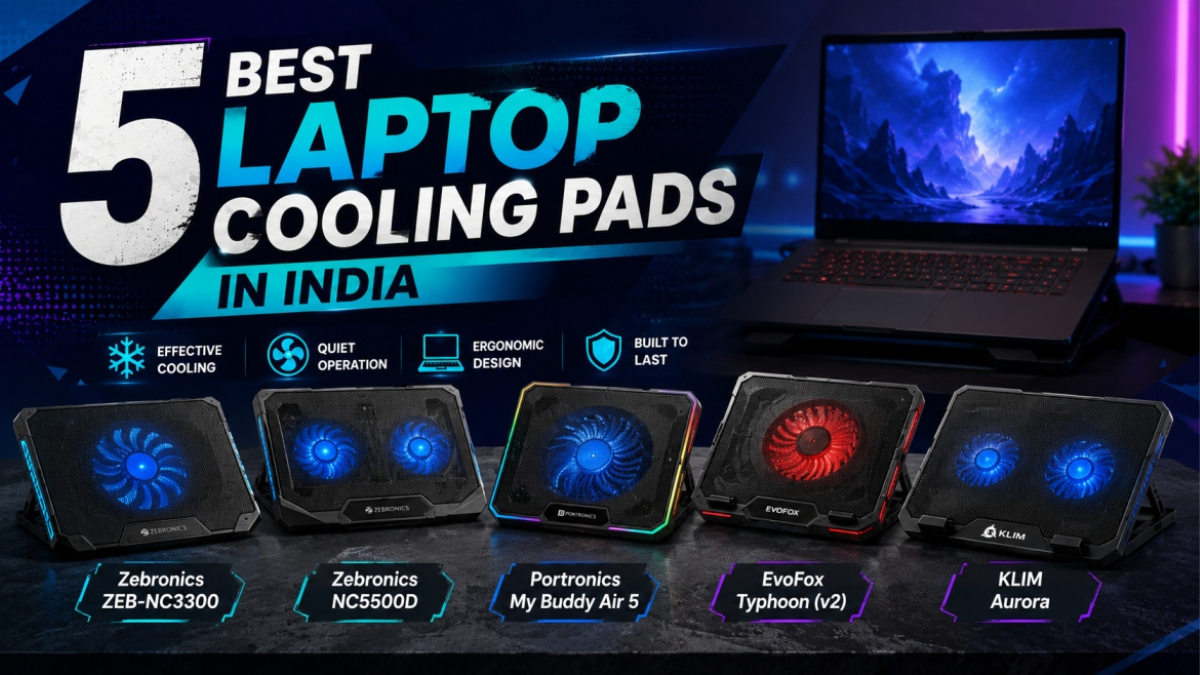
5 Best Laptop Cooling Pads in India (2026)
Your Laptop Is Throttling — And You Probably Don’t Know It
Here’s something most laptop owners in India never find out: when your laptop gets hot enough, Intel and AMD CPUs automatically reduce their clock speeds to prevent damage. This is called thermal throttling. Your laptop slows itself down silently — your export takes twice as long, your FPS in BGMI drops mid-match, your browser starts stuttering. You blame the laptop. The real culprit is heat. These Best Laptop Cooling Pads in India will help you with these problems.
In Indian summers — where April temperatures in Pune, Hyderabad, and Chennai regularly cross 40°C — thermal throttling isn’t a rare edge case. It’s a daily reality for lakhs of laptop users running their machines for 6–8 hours on a desk with no airflow underneath.
A good laptop cooling pad fixes this by pulling air through your laptop’s bottom vents, dropping CPU temperatures by 8–12°C on gaming laptops and 3–6°C on office machines. That’s often the difference between throttling and not throttling.
The problem is that the cooling pad market in India is flooded with cheap, underpowered options from no-name brands that barely move any air. I’ve gone through spec sheets, Amazon review data, and multiple testing roundups to find five pads that actually work — one for each type of buyer — from ₹549 to ₹1,899.
What I evaluated:
- Fan size and count (larger fans move more air at lower, quieter RPM)
- Cooling effectiveness (real-world temperature drop based on user data and testing reports)
- Build quality and surface material (metal mesh beats plastic for heat dissipation)
- Height adjustability (ergonomics matter for 8-hour work sessions)
- Laptop size compatibility (15.6″ vs 17″ support)
- Price-to-performance ratio at Indian retail prices
One thing worth saying upfront: no cooling pad will fix a laptop with clogged internal vents or dried-out thermal paste. If your laptop is several years old and overheating severely, clean the vents first with compressed air. Then a cooling pad will genuinely help.
Quick Comparison Table
| Cooling Pad | Price (approx.) | Fans | Fan Size | Height Levels | Max Laptop Size | Best For |
|---|---|---|---|---|---|---|
| Zebronics ZEB-NC3300 | ₹549–₹599 | 2 | 120mm | 1 angle | 15.6″ | Absolute budget pick |
| Zebronics NC5500D | ₹699–₹799 | 2 | 125mm | 5 levels | 15.6″ | Budget + fan speed control |
| Portronics My Buddy Air 5 | ₹1,128–₹1,280 | 2 | 125mm | 5 levels | 17″ | Office and WFH use |
| EvoFox Typhoon (v2) | ₹1,299–₹1,499 | 6 | Mixed | 4 angles | 15.6″–17″ | Gaming laptops |
| KLIM Aurora | ₹1,699–₹1,899 | 4 | Premium | 2 positions | 17″ | Premium buy-once option |
Prices fluctuate. Always verify on Amazon.in before purchasing.
1. Zebronics ZEB-NC3300 — Best Budget Laptop Cooling Pad in India
Price: ~₹549–₹599 | Fans: 2 × 120mm | Height: 1 fixed angle | Max Size: 15.6″ | USB Ports: 2
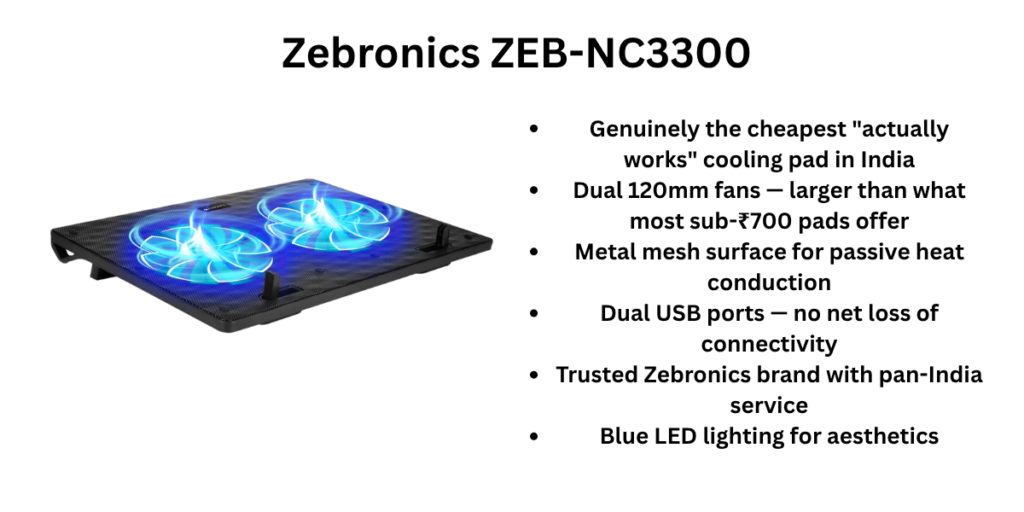
The Zebronics ZEB-NC3300 is the answer to the most common question in this category: “What’s the cheapest cooling pad that actually works?” At ₹549 on Amazon, it’s the floor price for a cooling pad that’s genuinely worth buying — anything cheaper is a waste of money.
What makes the NC3300 viable at this price is the fan size. Two 120mm fans are significantly better than the tiny 60–70mm fans crammed into ultra-cheap pads. Larger fans move more air per rotation at lower RPM, which means quieter operation and real airflow through your laptop’s bottom vents. For office laptops and light daily use, the NC3300 will take 2–3°C off your CPU temperature and — more practically — stop your laptop from building up heat during 4–5 hour sessions.
The metal mesh surface is a genuine plus at this price. Metal conducts and dissipates heat passively, unlike plastic surfaces that trap warmth between the pad and the laptop bottom. The dual USB 2.0 ports mean you don’t lose a USB slot to power the pad — you actually gain one.
The blue LED lighting on the fans looks nice in a dark room, though it can’t be turned off independently.
The honest trade-offs at ₹549: there’s only one fixed angle (no height adjustment beyond the retractable stopper), the build is entirely plastic and feels lightweight in hand, fan speed is fixed (no control), and it supports only up to 15.6″ laptops. For ₹200 more, the NC5500D addresses most of these gaps. But if ₹550 is your hard limit, this is the only option worth buying.
Pros:
- Genuinely the cheapest “actually works” cooling pad in India
- Dual 120mm fans — larger than what most sub-₹700 pads offer
- Metal mesh surface for passive heat conduction
- Dual USB ports — no net loss of connectivity
- Trusted Zebronics brand with pan-India service
- Blue LED lighting for aesthetics
Cons:
- No height adjustment — fixed angle only
- No fan speed control — runs at one speed always
- Supports only up to 15.6″ laptops
- Plastic build quality — won’t survive rough handling
- Some units reported stopping after 2–3 months in online reviews
Who Should Buy the Zebronics ZEB-NC3300?
Students on the tightest possible budget who have an office or college laptop up to 15.6″ and need basic cooling for exam season or long study sessions. Also good as a second pad to keep at a hostel versus home. If you have a gaming laptop or need height adjustment for ergonomics, spend more on the NC5500D or Portronics Air 5.
2. Zebronics NC5500D — Best Value Cooling Pad with Fan Speed Control
Price: ~₹699–₹799 | Fans: 2 × 125mm | Height: 5 levels | Max Size: 15.6″ | USB: 1 port
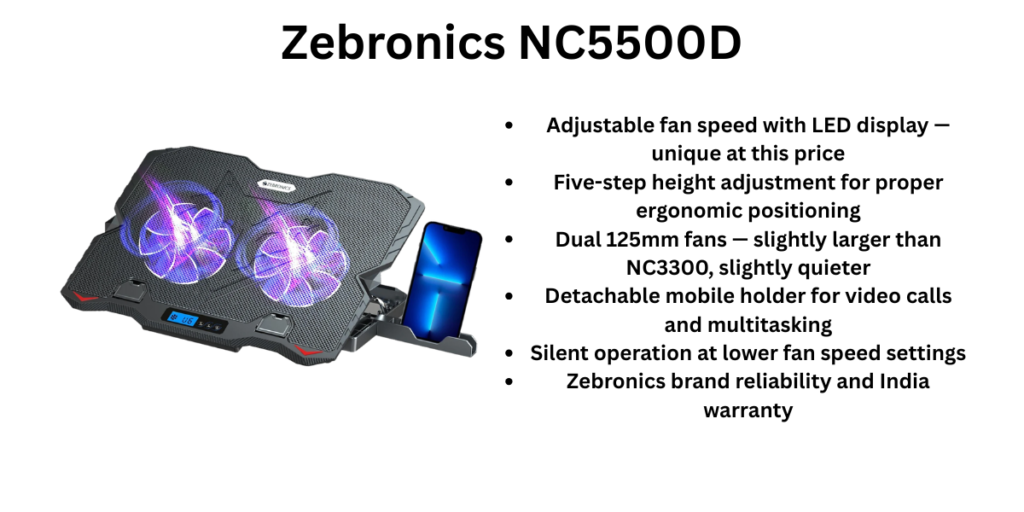
For ₹200 more than the NC3300, the Zebronics NC5500D is a meaningfully better product. The upgrade is real, not cosmetic. You get slightly larger 125mm fans, five-level retractable height adjustment, adjustable fan speed with an LED display showing the current level, silent operation, and a detachable mobile holder for keeping your phone visible during video calls. At ₹749, no other cooling pad in India matches this feature count.
The fan speed display is unique in the budget segment — no other pad under ₹1,000 in India has this. It lets you run the fans at lower speed during light work (quieter, less power draw) and crank them up during a long Premiere Pro export or a gaming session. This flexibility is genuinely useful over months of daily use.
The five-level height adjustment deserves its own mention. A lot of Indian laptop users buy cooling pads purely for cooling and discover only after buying that the elevated, angled position is better for their neck and wrists during long sessions. The NC5500D gives you proper ergonomic angles, not just cooling.
The real-world limitations are worth knowing. User reviews on Amazon consistently flag two things: the NC5500D is limited to 15.6″ laptops (a 16″ laptop will hang off the edges), and the plastic build has had some durability complaints after 5–6 months of heavy use, with the base showing stress fractures under heavier laptops. Build it into your expectations — this is still a budget product.
Pros:
- Adjustable fan speed with LED display — unique at this price
- Five-step height adjustment for proper ergonomic positioning
- Dual 125mm fans — slightly larger than NC3300, slightly quieter
- Detachable mobile holder for video calls and multitasking
- Silent operation at lower fan speed settings
- Zebronics brand reliability and India warranty
Cons:
- Only up to 15.6″ laptop support — 16″ laptops won’t fit properly
- Plastic build — reports of base cracking after heavy use
- Mixed user reviews on long-term fan reliability
- Single USB port (unlike NC3300’s dual ports)
- Cooling improvement is modest at 1–2°C — more about ergonomics than raw thermal performance
Who Should Buy the Zebronics NC5500D?
Students and home users who want a step up from basic cooling — specifically the ergonomic height adjustment and fan speed control — without crossing ₹800. This is also the right pick for anyone who uses their laptop for video calls and wants the mobile holder convenience. If you have a 17″ laptop or a gaming machine that runs very hot, spend more on the Portronics or EvoFox. This is considered one of the Best Laptop Cooling Pads in India.
3. Portronics My Buddy Air 5 — Best Cooling Pad for Office and WFH Use
Price: ~₹1,128–₹1,280 | Fans: 2 × 125mm | Height: 5 levels | Max Size: 17″ | USB Ports: 2 (1 pass-through)
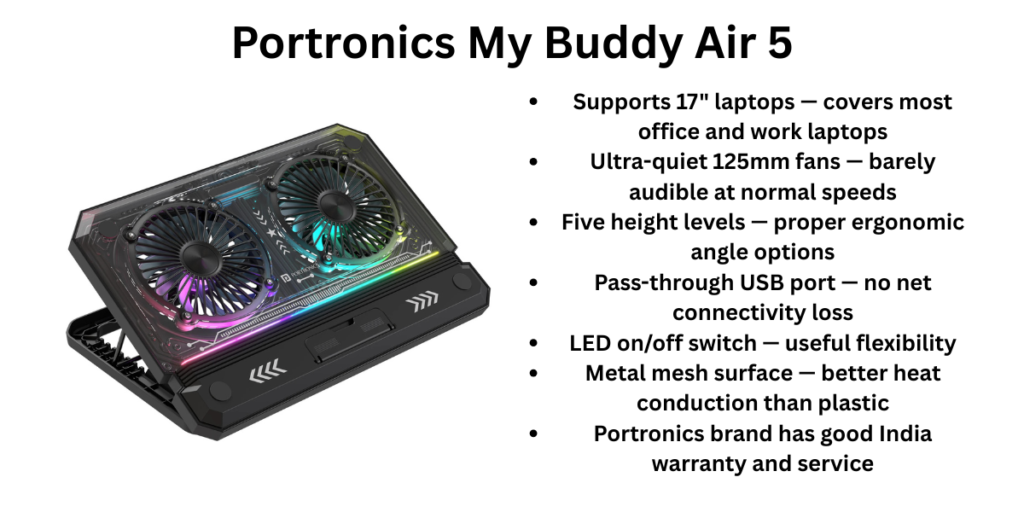
The Portronics My Buddy Air 5 is the cooling pad I’d recommend to most working professionals and WFH users in India without hesitation. It hits the sweet spot between price and practicality — priced under ₹1,300, it supports 17″ laptops, has five-level height adjustment, runs on whisper-quiet 125mm fans, and includes a pass-through USB port so you don’t lose any connectivity.
The 17″ laptop support is the big differentiator from budget Zebronics options. If you use a larger Dell, HP, or ASUS laptop for work, most sub-₹1,000 pads won’t hold it properly. The Portronics Air 5 handles it cleanly — the wider surface gives full support with no overhang.
For WFH and office use, the 125mm fans at low RPM are genuinely quiet. In a typical home office setup, you won’t hear them over normal ambient noise. This matters significantly if you’re on video calls for 4–5 hours daily — a loud cooling pad fan becomes distracting for you and people on the other end of the call.
The metal mesh surface contributes passive heat dissipation alongside the active fan cooling. Unlike the plastic-bodied Zebronics options, the Portronics Air 5’s construction feels sturdier, and user reviews consistently note good longevity over 1–2 years of regular use.
The LED backlighting has an on/off switch — a small but thoughtful detail that lets you turn off the light without switching off the fan during daytime use.
Real limitation: the Air 5 has only two fans versus the EvoFox Typhoon’s six. For gaming laptops or heavy video editing workloads, the limited total airflow means you’ll see only a 4–6°C temperature drop versus 8–12°C from the EvoFox. For spreadsheets, coding, Zoom calls, and document work — the Air 5 is more than sufficient.
Pros:
- Supports 17″ laptops — covers most office and work laptops
- Ultra-quiet 125mm fans — barely audible at normal speeds
- Five height levels — proper ergonomic angle options
- Pass-through USB port — no net connectivity loss
- LED on/off switch — useful flexibility
- Metal mesh surface — better heat conduction than plastic
- Portronics brand has good India warranty and service
Cons:
- Only 2 fans — limited cooling for gaming laptops under heavy load
- No fan speed control — fixed speed only
- Some users report quality control variation between units
- RGB enthusiasts will find it plain — just simple LED, no colour modes
Who Should Buy the Portronics My Buddy Air 5?
Working professionals, remote workers, coders, and students using 15.6″–17″ laptops for 6–8 hour daily sessions. If you spend most of your time on productivity tasks and video calls, this is the ideal combination of quiet operation, ergonomic height, and 17″ support. Don’t buy this if you’re a gamer who needs aggressive cooling under sustained load — that’s the EvoFox’s territory.
4. EvoFox Typhoon (v2) — Best Cooling Pad for Gaming Laptops in India
Price: ~₹1,299–₹1,499 | Fans: 6 | Height: 4 adjustable angles | Max Size: 17″ | USB Ports: 2 | RGB: Yes
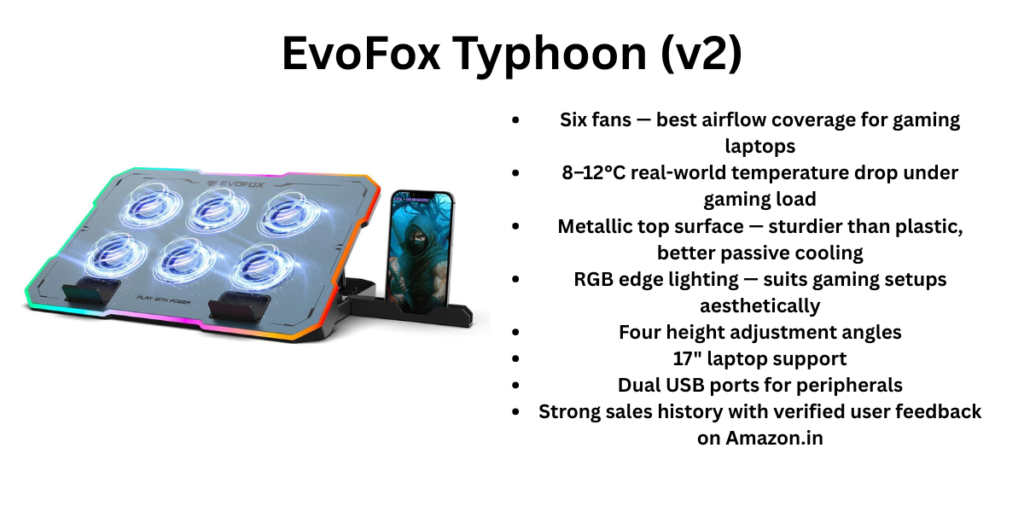
If you have a gaming laptop — an ASUS TUF, Lenovo IdeaPad Gaming, MSI, Acer Nitro, or HP Pavilion Gaming — the EvoFox Typhoon v2 is the most compelling option in India under ₹1,500. Six fans distributed across the pad’s surface provide airflow coverage that dual-fan pads simply can’t match.
The reason multi-fan layouts matter for gaming laptops specifically is heat distribution. When your CPU and GPU are both under heavy load — say, running Valorant at high settings or rendering a 4K video — heat builds up across the entire bottom surface of the laptop, not just in one spot. A single large fan or two fans positioned centrally miss the edges where secondary heat sources accumulate. Six smaller fans positioned across the pad address this more comprehensively, and user-reported temperature drops of 8–12°C during gaming sessions are consistent in EvoFox Typhoon reviews.
The metallic top surface is a meaningful quality step up from the plastic mesh on budget options. It feels premium, supports heavier gaming laptops (typically 2.3–2.8 kg) without flexing, and adds passive thermal conductivity. The RGB lighting on the v2 version runs around the edge, giving a clean gaming setup aesthetic without being garish.
Four adjustable height angles let you find a comfortable position for gaming sessions — important because gaming laptop users tend to sit in one position for longer stretches than office users.
At ₹1,299–₹1,499, this is objectively the best price-per-cooling-performance ratio in the Indian market for gaming use. The EvoFox Typhoon has sold consistently across Amazon and Flipkart for several years, and real-user review data supports its effectiveness.
Pros:
- Six fans — best airflow coverage for gaming laptops
- 8–12°C real-world temperature drop under gaming load
- Metallic top surface — sturdier than plastic, better passive cooling
- RGB edge lighting — suits gaming setups aesthetically
- Four height adjustment angles
- 17″ laptop support
- Dual USB ports for peripherals
- Strong sales history with verified user feedback on Amazon.in
Cons:
- Six small fans can be louder than two large 125mm fans at equivalent airflow
- RGB cannot be customised — preset modes only on some versions
- More bulk than dual-fan pads — slightly heavier for carrying in a bag
- Overkill for office laptops that don’t throttle thermally
Who Should Buy the EvoFox Typhoon v2?
Gamers, video editors, and anyone running CPU/GPU-intensive workloads on a 15.6″–17″ gaming or high-performance laptop. If your laptop regularly hits 85–90°C during load and you’ve noticed performance stutters or FPS drops mid-session, the EvoFox Typhoon is the most cost-effective fix you can buy. Also a great option for engineering students running simulation or CAD software that keeps the processor under sustained load.
5. KLIM Aurora — Best Premium Laptop Cooling Pad in India
Price: ~₹1,699–₹1,899 | Fans: 4 premium fans | Height: 2 positions | Max Size: 17″ | USB Ports: 2 | Warranty: 5 years
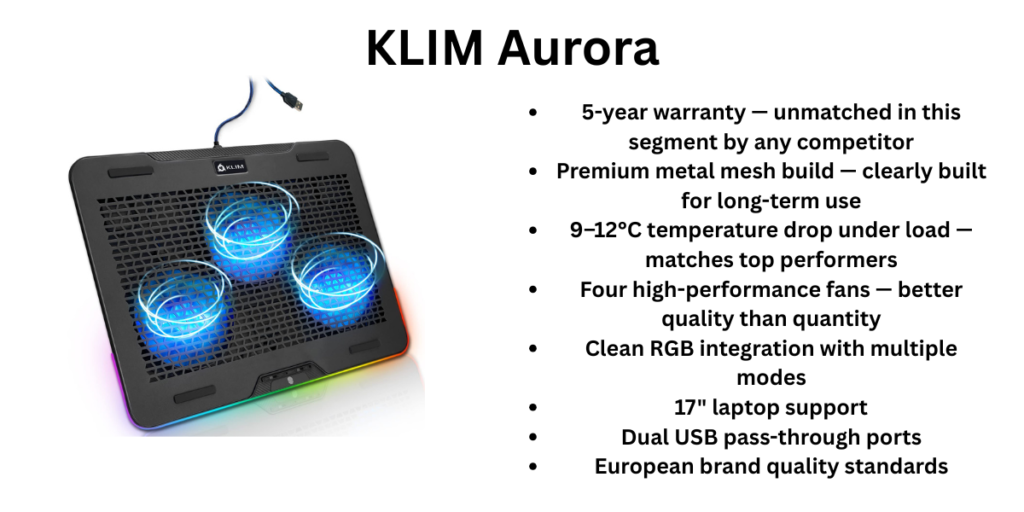
The KLIM Aurora is the only European brand on this list, and it shows. Where Indian and Chinese brands compete on fan count and RGB features, KLIM competes on longevity, build precision, and after-sales commitment. The 5-year warranty it ships with is the strongest in this category by a wide margin — every competitor offers 1 year.
Four high-performance fans at 1,200 RPM provide serious airflow. The premium metal mesh construction feels built to last years, not months, and the build quality handles heavier gaming laptops with no flex or instability. Measured temperature drops during heavy use are consistently in the 9–12°C range, matching the EvoFox Typhoon’s performance with fewer fans — because fan quality and airway design matter more than fan count alone.
KLIM also has proper RGB integration, with modes that are better controlled and more varied than the budget options. It supports up to 17″ laptops and has two USB 2.0 pass-through ports.
Here’s the practical case for spending ₹1,899 instead of ₹1,399 on the EvoFox: if you do a cost-per-year analysis, the KLIM Aurora at ₹1,899 over 5 years works out to ₹380 per year. A budget cooling pad at ₹800 that needs replacing every 18–24 months costs more over the same period. If you own an expensive gaming laptop (₹60,000+) and want a cooling pad that won’t become a source of frustration in year 2, the KLIM Aurora is the right buy.
The only real trade-off versus the EvoFox Typhoon is height flexibility — the Aurora has only two positions compared to the Typhoon’s four angles. For most desk setups this is fine, but users who want granular tilt control will notice the limitation.
Pros:
- 5-year warranty — unmatched in this segment by any competitor
- Premium metal mesh build — clearly built for long-term use
- 9–12°C temperature drop under load — matches top performers
- Four high-performance fans — better quality than quantity
- Clean RGB integration with multiple modes
- 17″ laptop support
- Dual USB pass-through ports
- European brand quality standards
Cons:
- Most expensive on this list at ₹1,899
- Only 2 height positions — less ergonomic flexibility than EvoFox or Portronics
- KLIM is less recognised in India, so offline service is not widely available
- Marginal performance improvement over EvoFox Typhoon at nearly ₹500 more
Who Should Buy the KLIM Aurora?
Anyone who wants to buy a cooling pad once and not think about it for years. If you own a premium gaming or workstation laptop in the ₹70,000–₹1,50,000 range and don’t want to compromise on the accessory supporting it, the KLIM Aurora is the mature choice. Also the right pick for professionals who use their laptop as a primary work machine and want the reliability guarantee that the 5-year warranty provides. Many people call this one of the Best Laptop Cooling Pads in India.
Final Verdict — Which Laptop Cooling Pad Should You Buy?
Here’s the honest breakdown by buyer type:
Tightest budget (under ₹600): The Zebronics ZEB-NC3300 at ₹549 is the floor for a cooling pad worth buying. Don’t go cheaper.
Best value step-up (under ₹800): The Zebronics NC5500D at ₹749 is the smarter buy over the NC3300 for most people — the fan speed display, five height levels, and mobile holder are real quality-of-life improvements for ₹200 more.
For WFH and office users: The Portronics My Buddy Air 5 at ₹1,128–₹1,280 is the best all-day companion for productivity-focused laptop use. Quiet, ergonomic, supports 17″ laptops, and built to last.
For gaming laptops: The EvoFox Typhoon v2 at ₹1,299–₹1,499 offers the best cooling performance per rupee for gaming and high-load workloads. Six fans, metal top, RGB, 8–12°C drop — nothing else at this price comes close for gamers.
For long-term reliability: The KLIM Aurora at ₹1,699–₹1,899 and its 5-year warranty make the most sense if you’re buying a cooling pad for a premium laptop you intend to keep for years.
If I had to pick one for the widest audience, it would be the Portronics My Buddy Air 5 — it covers most Indian laptop users (office, WFH, students with larger laptops) at a genuinely fair price. Gamers should go straight to the EvoFox.
Frequently Asked Questions
Q: Do laptop cooling pads actually work?
Yes, but the results vary by laptop type. Gaming laptops and high-performance laptops with good bottom vents see the biggest improvement — typically 8–12°C under load, which directly prevents thermal throttling and maintains FPS and rendering performance. Office laptops see 2–5°C drops, which matters more for long-term component health than immediate performance.
Q: What is thermal throttling and how does a cooling pad help?
When a CPU reaches its maximum safe temperature (typically 90–95°C on most laptops), it automatically reduces its clock speed to cool down. This throttling causes FPS drops, slow exports, and general sluggishness. A cooling pad lowers the operating temperature below the throttling threshold, keeping performance consistent.
Q: Is a cooling pad with more fans always better?
Not exactly. Larger fans at lower RPM move more air with less noise than many small fans at high RPM. For gaming laptops, multi-fan pads (like the EvoFox Typhoon) distribute airflow better across a large surface. For office use, dual 125mm fans (like in the Portronics Air 5) are quieter and equally effective.
Q: Which cooling pad is best for a 17-inch gaming laptop in India?
The EvoFox Typhoon v2 and the Portronics My Buddy Air 5 both support 17″ laptops. For gaming, go with the EvoFox for better thermal performance. For office work, the Portronics Air 5 is quieter and more ergonomic.
Q: Will a cooling pad help my MacBook?
MacBook Air with Apple Silicon (M-series chips) manages thermals differently and doesn’t benefit much from external cooling pads because the chip throttles based on sustained workload, not temperature alone. MacBook Pro and Intel-based MacBooks do benefit. For M-series MacBooks, a laptop stand that improves airflow underneath is more useful.
Q: Can I use a cooling pad in India’s summer months when room temperature is 40°C+?
Yes, and this is where they matter most. Even with a higher ambient temperature, a cooling pad reduces the delta between the laptop’s CPU temperature and the surrounding air, which keeps the thermal throttling threshold further away. During Indian summers without AC, a cooling pad can be the difference between a laptop running at full performance and one that throttles within 20 minutes.
Q: Where can I buy these cooling pads?
All five are available on Amazon.in and Flipkart. The Zebronics and Portronics options are also available in Reliance Digital and offline electronics stores in most Indian cities. KLIM Aurora is primarily available online.
Also read: 5 Best Bluetooth Speakers Under ₹3,000 in India (2026)